

How to order SMS credits
SimDay can be setup to send and receive SMS messages with patients. Before you can use this feature you will need to contact ACSS to get account details and purchase SMS credits.
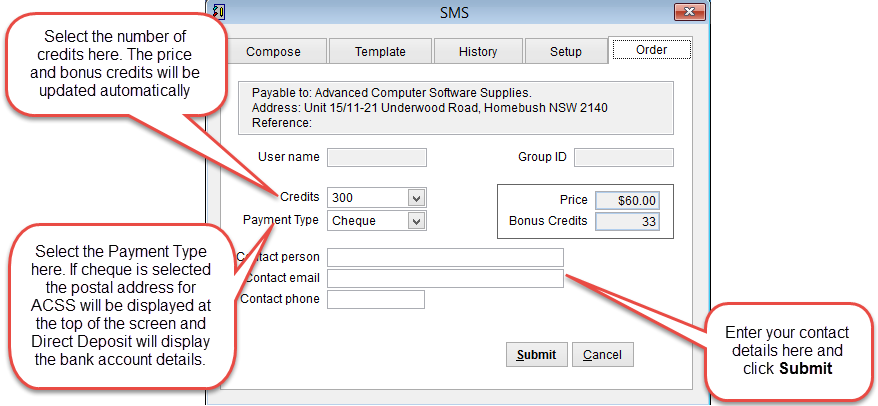
If Cheque is selected as the Payment Type the postal address for ACSS will be displayed at the top of the screen.
If Direct Deposit is selected then the bank account details will be displayed at the top of the screen.
When paying with direct debit from your bank account please add your ADV number in the reference area.
Click Submit to send your order or Cancel to discard any changes and close the screen.
When you click Submit you will be prompted to enter the system password.
Enter the password and click OK.
A confirmation screen should appear confirming that your order has been sent.

ACSS should contact you by email the next business day and send an invoice to confirm your order.
Once payment has been received the SMS scredits will be added to the account. Typically it takes 2-3 days for processing to be completed.