

Age Statistics Report
The Age Statistics Report is an excel file that shows all patients that were discharged within a specified period by age and sex.
Click on Reports in the main menu and then More Reports in the sub menu to see a list of various statistical reports.
Click on the Age Stats button at the top of the list.
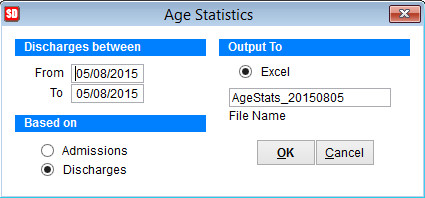
In The Discharges between section enter the date range.
Select Based on Admissions or Discharges.
Click OK to create an excel file in the tmp folder stored in the SimDay folder on your computer.
The typical path would be C:\SimDay\tmp\.
The file name will be AgeStats_YYYYMMDD.xls where YYYY=Year, MM= Month & DD= Day. Call SimDay support if you need help finding the file.
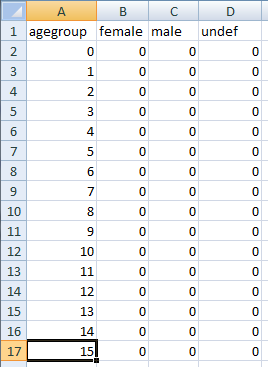
The above screenshot is the Age Statistics report.
Age Group lists all ages up to 100 and then 1 group for ages over 100.
The B, C & D columns are for the sex of the patient with the D column meaning the sex is undefined.