

Incomplete Report
This is a handy report to assist you in making sure the business is running smoothly and nothing is being left out.
Click on Reports in the main menu and then Incomplete Rpt in the sub menu to open the Incomplete Report Screen..
Un Coded Shows all patients that have not been coded (diagnosis or procedure) within the selected date range.
Un Grouped Will show all patients within the date range that haven’t been grouped (DRG coded)
No MBS Item Displays any patient that doesn’t have any MBS items listed in the theatre screen
Online Invoices Used with Thelma, which has been replaced by ECLIPSE.
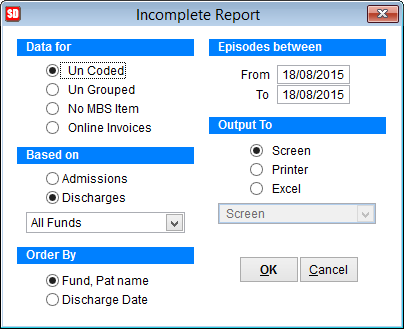
Data for Set which report you want to view by clicking on the radio buttons
Based on Select to base the report on Admissions or Discharges. If you just want the report for one particular health fund, drop the box down and select a fund
Order By Chose the way to order the report
Episodes between Set the date range for the report. From is the oldest date of the report and To is the most recent date. To get a report for the dates 1/1/2011 – 31/01/2011 the dates selected would be From 1/1/2011 To 31/01/2011.
Output To
Screen to view the report on the monitor,
Printer and the drop down box will become active to select the printer for the report
Excel to save the report in an excel format on the local PC. By default the excel filename is incomplete_yyyymmdd where yyyy is year, mm is month and dd is day. IE A report generated on the 19th of August 2015 would be inomplete_20150819. The name can be modified by typing over the filename and it is saved in the SimDay tmp folder on the local computer. C:\simday\tmp
Click OK to create the report or Cancel to discard changes and return to the previous screen.