Arrears Report
The Arrears/Debtors Report identifies outstanding debts and gives an in depth view of how long each debt has been outstanding for.
Click on Reports in the main menu, and then Arrears Report in the sub menu.
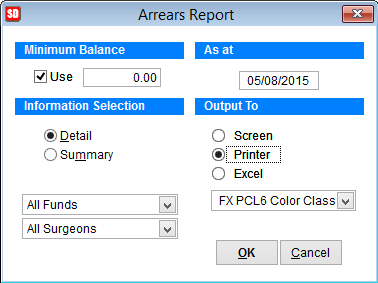
Minimum Balance You can specify a minimum balance owing. E.g. only see debts over $0.00.
Click on the Use box which puts a tick inside and activates the field to specify the minimum balance. Otherwise the report will also show patients that are in credit because they have pre paid but are yet to be billed.
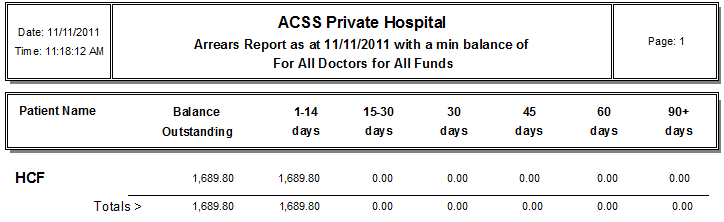
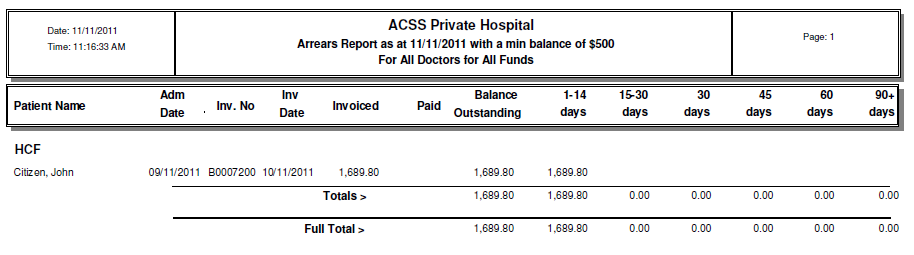
Information Selection The default is set to Detail which shows all individual invoices, whereas the Summary will just show a breakdown of the health funds and a total amount owing for each.
If you just want to see one particular funds outstanding debt or one particular surgeon use the drop down boxes and select a fund, surgeon, or both.
As at The date will show the current date but you can backdate if you wish to by overwriting the date
If you backdate the ‘As at’ date, debts will show up that have been paid off after the date you entered.
Output To Select either Screen, Printer or Excel file, then click OK.
Detailed View
Summary View