

ICD Diagnosis Analysis Report
This report shows a breakdown of ICD codes used as either a primary or additional code within the diagnosis coding screen for patients within a given date range.
Click on Reports in the main menu and then More Reports in the sub menu which will show a list of various statistical reports.
Click on the ICD Diag Analysis button.
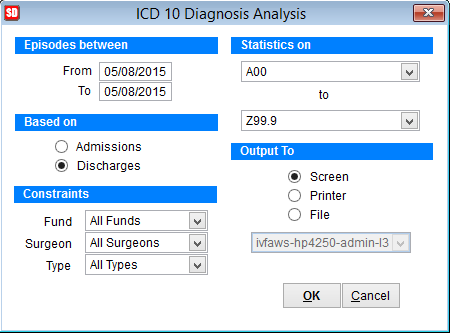
Episodes Between Enter the date range for the report
Based on select Admissions or Discharges
Constraints Chose a particular fund, surgeon or type using the drop down boxes
Statistics on Use the 2 drop down boxes to specify the range of ICD Diagnosis Codes to view data on. To view all ICD Diagnosis codes drop the 2nd box down and select the last ICD code at the bottom of the list.
Output To Screen (to view), printer or file for an excel spreadsheet. When printer is selected, the drop down box becomes active and select the printer from the list.
Click OK.
When outputting to an excel file, the file will be created in the tmp folder within the SimDay folder of your computer.
The typical path would be c:\SimDay\tmp\. The filename will be called ICDDiag_YYYYMMDD.xls, where YYYY= Year, MM= Month & DD= Day
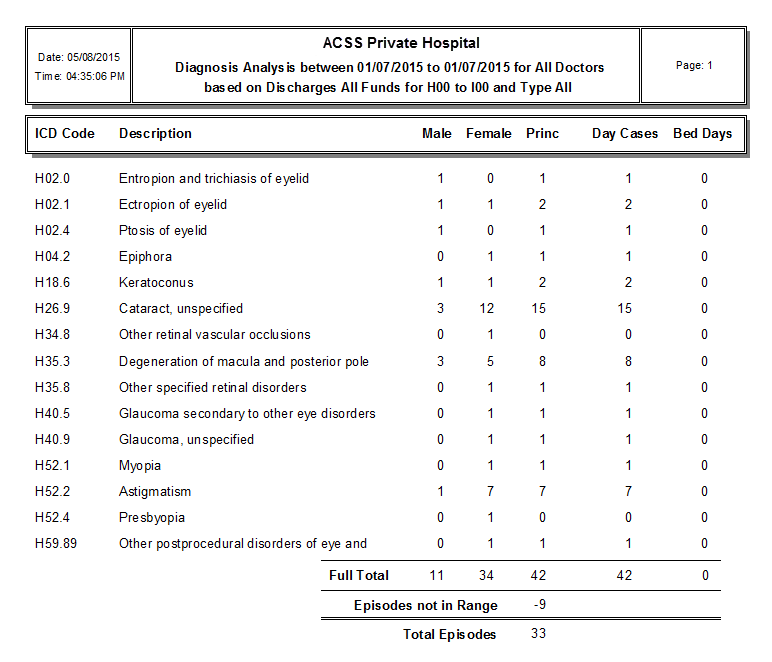
The above report shows each ICD Diagnosis code within the specified data range, the gender of each patient and a count of how many day patients (Day Cases) or overnight days (Bed Stays).