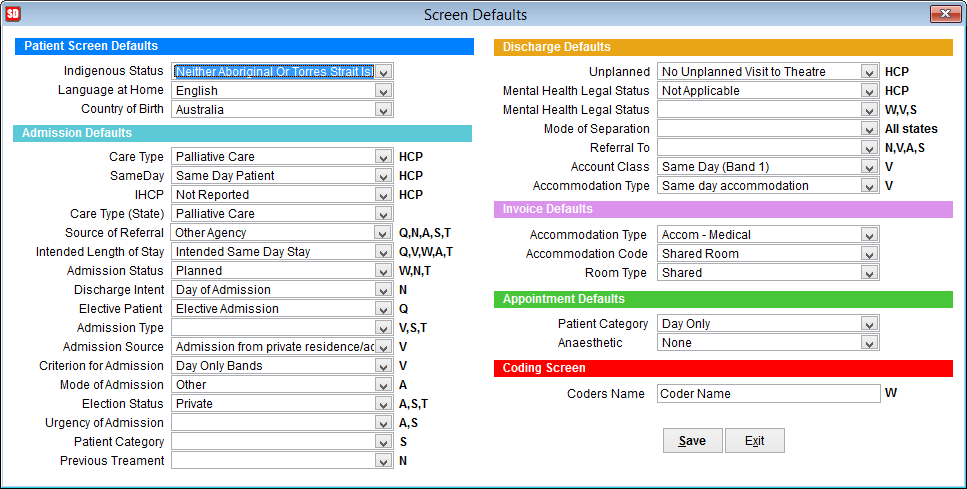
How to set SimDay screen defaults
SimDay can be configured to display the most commonly used options by default for the hospital. If the same options are selected for the majority of patients this can reduce the processing time required for each patient, particularly during admission and discharge.
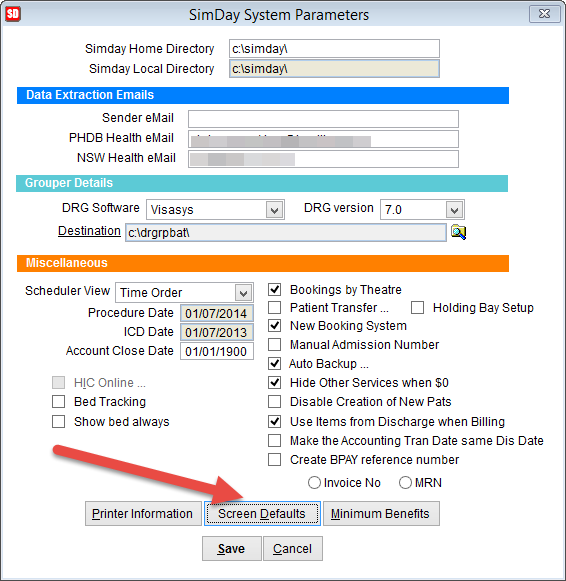
Go to the main menu in SimDay.
Click Maintenance and System Param
Click on the tab Screen Defaults at the bottom of the screen .
The letters after the fields denote which states are applicable. Q– Queensland, N – New South Wales, V– Victoria, W– Western Australia, A-Australian Capital Territory, S– South Australia.
HCP Hospital Casemix Protocol
The headings Patient Screen Defaults, Admission Defaults, Discharge Defaults, Invoice Defaults and Coding Screen refer to the name of the screen where these defaults appear.
Select the defaults to appear when these screens are selected and click Save or Exit to close the screen.