

How to unlink a health fund
Health funds can be linked together so they share fees and are reported in a single data extract file.
Here we’ll show you how to remove a health fund from a group that it was linked to previously.
Go to the Health Fund screen.
From the main menu click Setup and Health Fund List
A list of health funds will be displayed and you can either search using the health fund name (IE Healthguard) the code (IE HHB) or just scroll down the list and click on the fund to be modified.
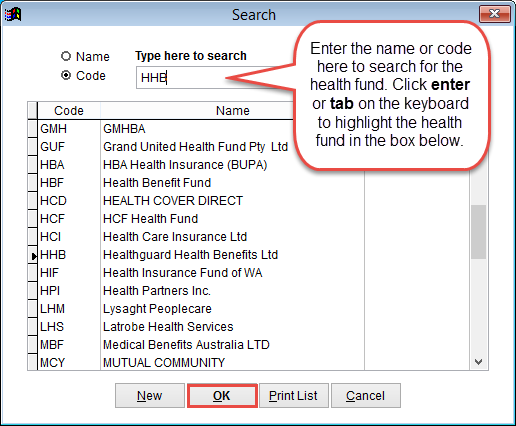
Once the health fund is highlighted from the list click OK to see the details.
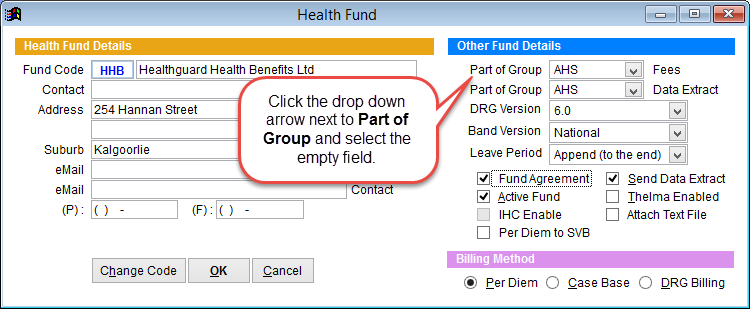
In the example above HHB is linked to AHS. To remove HHB from this group click on the arrow next to Part of Group and select an empty line with the mouse.
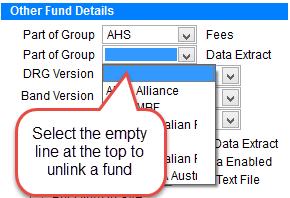
Remember to check both Fees and Data Extract at the top of the screen.
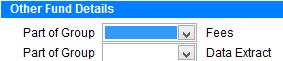
When completed click OK to save changes or Cancel to discard changes and return to the previous screen.