

Other Facility Set Up
This list is used when you have a patient that has been transferred from or to another facility, which show up on the ‘Admission’ and ‘Discharge’ screens.
Click on Setup in the main menu, and then Facility Setup in the sub menu which will show you a list of hospitals previously set up.
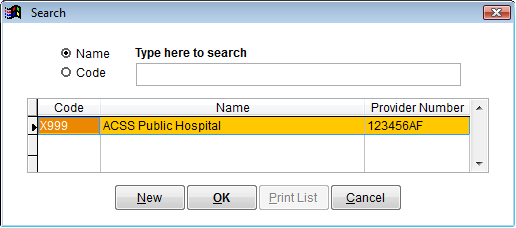
You can search for a facility by entering the name in the search box or clicking on the Code radio button and searching by code. You can also scroll through the list using the vertical scroll bar on the right.
To view a facility in the list, double click the name. You can then change any details of that facility.
Click on the New button to create a new facility.
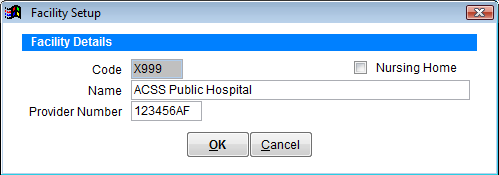
Code Enter the hospitals hospital code/facility number under Provider Number. This code can’t be changed once created so be sure to have the correct number.
This code is assigned by the State Health Dept. If you don’t know the code you can either call the hospital or the State Health Dept to find out. If you are calling somewhere to find the code, remember to also ask for the provider number if you don’t already know it.
Enter the Facility name & Provider number, and then click the OK.
Also tick the Nursing Home box if you are entering a nursing home.
Once you have created an ‘Other Facility’ it will appear in the drop down boxes on the admission and discharge screen for ‘Transferred From’ and ‘Transferred To’ fields so you can accurately record where the patient was transferred from or transferred to.