

SimDay booking systems
SimDay has two options available for bookings.
Standard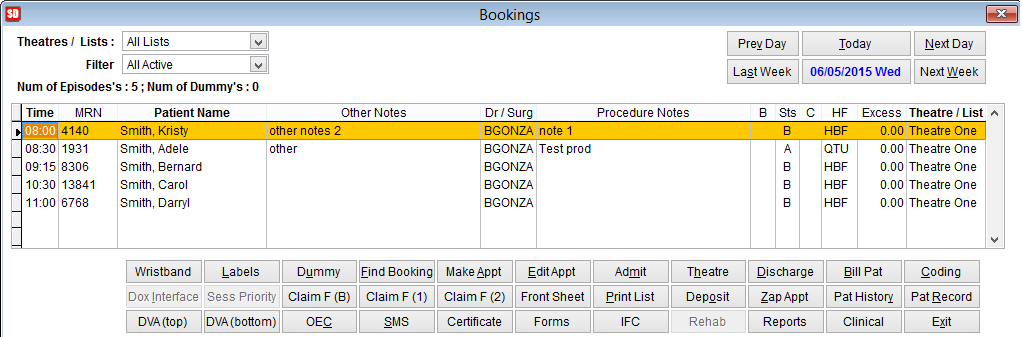 |
New Booking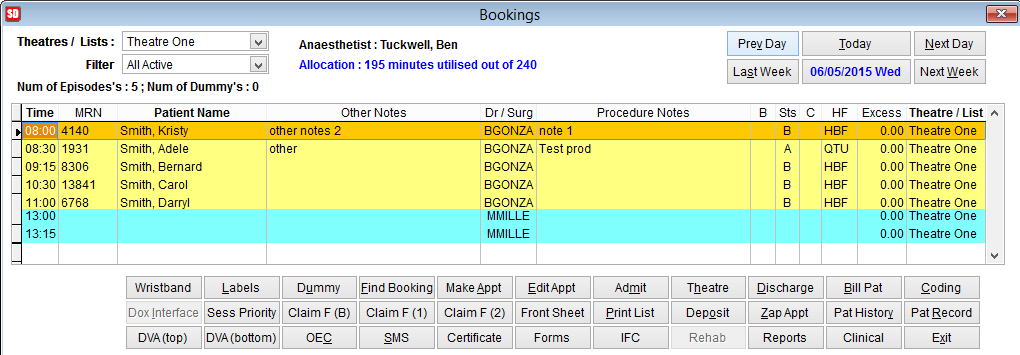 |
Standard Booking displays uses only one session for the day and appointments are displayed below each other. It is not necessary to specify the surgeon before adding the patient appointments. The Dr/Surgeon and Anaesthetist are selected when making the booking for each patient.
New Booking displays the day in two sessions and the Dr/Surgeon must be selected before the patients are booked. In this screen there is the option to change the order of patients in the schedule and colour is added to visually separate session 1 and session 2.
If there are multiple surgeons working during the same day in the same theatre the standard view would be sufficient.
If the hospital books theatres according to Dr/Surgeon and the order of patients requires modification we would recommend using the New Booking screen. New Booking allows the hospital to specify two different sessions I.E. Morning and Afternoon and a different doctor can be selected for each session. It’s possible to move patients from one session to another if necessary. For more information on these features refer to New Booking.
To change the booking system go to the main menu and click Maintenance, System Parameters and add a tick next to the field New Booking System.
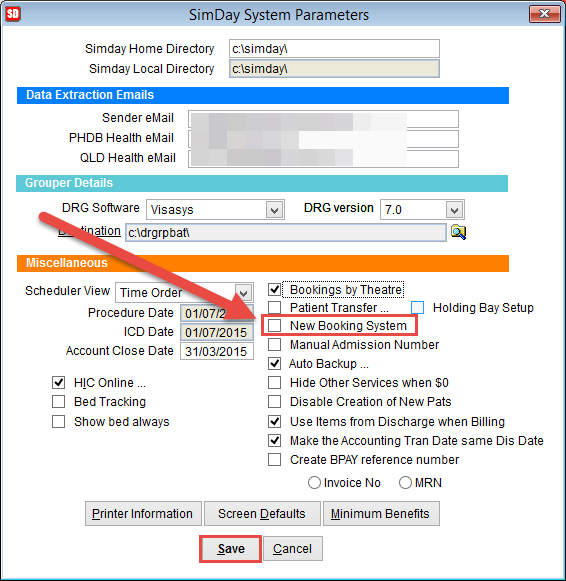
Click OK to save changes or Cancel to discard changes and return to the previous screen.